That difference is why selection starts from the usage profile rather than the switching function. Five criteria follow from that profile, and all have to hold at once: connection durability, feedback, readability, protection at the panel face, and chemical resistance. The subject here is the element and how it is chosen, as one part of the railway components a cab is assembled from – the layout of the desk is a separate subject.
The sections below work through what that means in practice: what endurance the element needs and why the mechanical and electrical figures differ, what the driver has to perceive, how light, panel-face exposure and the mechanical environment narrow the choice, and what a datasheet must state before one component can be compared with another.
How Does a Driver’s Desk Differ from an Industrial Workstation?
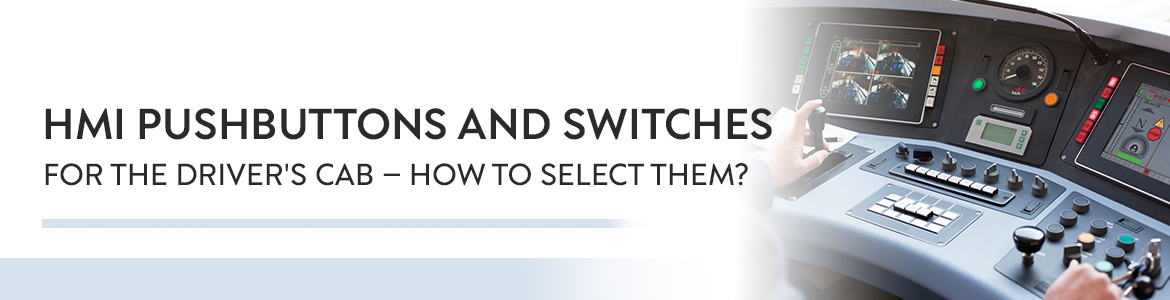
The main difference between a driver’s desk and an industrial workstation is the operator’s field of attention. On a production line, the operator watches the machine, and the console can afford to demand attention. In a cab, attention belongs to the track, and the desk works in the margins of it.
That shapes how the controls are used, since they are actuated constantly over decades rather than during setup and shift changes. It shapes how feedback has to be delivered, since it has to register without a deliberate look at the panel in a driver’s cab. And it comes with a third difference the workstation never faces: the rolling stock moves, and the panel lives inside that movement, with everything that follows from it – vibration, thermal cycling, and shifting daylight.
What Types of HMI Controls Are Used in a Driver’s Cab?
The types of HMI controls used in a driver’s cab divide into momentary elements, maintained elements, and indicators, and each type puts a different line in the specification:
- Momentary pushbuttons carry most discrete commands and are usually illuminated, so one element holds both the command and its state.
- Rotary and lever selectors handle functions with more than two positions, and the actuator position itself provides the information.
- Key switches restrict access to protected functions and still have to work with gloves and in the cold.
- Mushroom actuators serve emergency stop and isolation functions, where the latched position is itself the safety state and release requires a deliberate action.
Indicators and audible devices fill in around them, while touch panels are confined to parameter-level functions that tolerate a menu.
The families are not interchangeable. An illuminated pushbutton brings an optical element with its own lifetime into a mechanical component, a selector adds a detent mechanism that wears independently of the contacts, and a key switch adds a mechanical interface that has to survive daily use at low temperature. Each of those adds a different line to the specification.
Which Parameters Determine the Choice of an HMI Pushbutton or Switch?
The choice of an HMI pushbutton or switch depends on connection durability, feedback, readability, degree of protection from the control panel side, and chemical resistance. What separates them is when they fail.
Endurance fails late and predictably, after a known number of operations. Readability fails gradually, as legends abrade and lenses yellow, with no clear threshold to measure against. Protection and chemical resistance can fail suddenly, when moisture, cleaning agents, or other contaminants reach the contact chamber or the actuator seal. Feedback can fail on the first day. Selecting on a single parameter means accepting the remaining failure modes on someone else’s timetable.
What Mechanical and Electrical Endurance Should the Control Have?
The control should have mechanical endurance in the order of a million cycles or more and electrical endurance rated for the specific load it switches. The two are not interchangeable. Mechanical life describes wear in the actuator, return spring, and detent under actuation alone. Electrical life describes contact erosion under current and is the shorter figure wherever the contacts carry a load. Quoting the mechanical figure for a component that switches an electrical load is the most common way a datasheet comparison misleads – the number is accurate, it simply answers a different question.
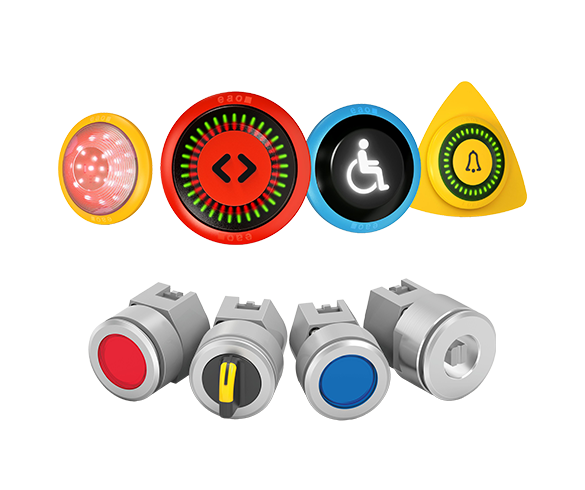
EAO driver’s-cab controls, including Series 04 and Series 84 illuminated pushbuttons, are offered in multiple contact, illumination and switching configurations, and the two endurance figures move independently across them. A variant with a higher mechanical lifetime can carry a lower electrical one – both figures belong to a specific configuration, not to a series.
Which figure constrains the selection depends on the function. A control operated constantly on a low-current signal input is limited by its mechanical life, while one operated rarely but switching an inductive load reaches its electrical-life limit long before the mechanism wears out.
What Feedback Does the Driver Need from the Control?
The driver needs two kinds of feedback from a control – actuation feedback and state feedback. Actuation feedback answers whether the element moved, and it is mechanical: operating force, switching point, and return stroke, all of it perceptible through a glove and without looking at the control. State feedback answers whether the function is active. A momentary button cannot provide that information from its position alone, because it returns to the same position whether the command took effect or not. That gap is why illuminated elements dominate cab desks – the backlight reports the state that the actuator cannot.
Both channels have to hold for decades. The feedback degrades gradually: operating force drifts as springs relax, legends abrade, and lens transmission falls. None of these appears as a failure in a functional test, but all of them erode the driver’s confidence that made the element worth specifying. In rolling stock controls, mechanical feel, optical indication, and long-term durability therefore have to be treated as parts of the same driver’s HMI interface rather than separate specifications.
How Do Cab Conditions Affect the Choice of HMI Component?
Cab conditions affect the choice of HMI component in three respects: the light in which the driver reads the element, the exposure at the panel face, and the resistance required to movement and chemicals. These are separate problems with separate failure modes, and good performance in one does not guarantee good performance in the other two.
These conditions are specific to the vehicle. Components used in rolling stock and infrastructure face different requirements, from temperature range and vibration exposure to fire behaviour and maintenance access, so specifications rarely transfer directly between the two.
How Do Changing Light Conditions Affect HMI Component Selection?
Changing light conditions mean that HMI selection has to consider more than illumination colour alone. Luminance range, contrast, viewing position and angle, the optical properties of the surface, and the risk of reflections and glare all affect whether an indication remains readable in full daylight and after dark. LED colour is usually the first optical parameter specified and, in many enquiries, the only one. Colour alone, however, is not enough to ensure reliable reading under changing cab conditions.
| Criterion | Usually declared as | Actually needed |
|---|---|---|
| Luminance | A single figure | A brightness range suitable for both strong daylight and darkness, with dimming capability |
| Contrast | Given for the element alone | Assessment in the final installation, against the desk background and with ambient light and possible reflections taken into account |
| Viewing angle | Perpendicular to the element | Readability from the driver’s normal seated position |
| Optical filter | Filter type | A design that limits reflections and supports contrast under the expected lighting conditions |
Light conditions in the cab can change very quickly. Low sun, a tunnel entry, station lighting, and full darkness may follow each other within minutes. The driver cannot be expected to adjust the backlighting manually at every transition. Dimmable backlighting with defined day and night levels is therefore the standard solution. The night setting should be low enough to avoid reflections in the windscreen.
How Should the IP Rating Be Interpreted for a Panel-Mounted Control?
For a panel-mounted control, the IP rating describes the front of the panel, not the component as a whole. The element seals against the cut-out, so it protects the cab side against dust, water, and cleaning agents – while its terminals sit in a space whose environment is set by the surrounding enclosure. Protection on that side belongs to the enclosures and cabinets for railway applications rather than to the control.
What Requirements Apply to HMI Component Resistance to Chemicals, Shock, and Vibration?
The vibration and shock resistance of HMI components installed in the driver’s cab is assessed in accordance with EN 61373, typically Category 1, with Class A or B selected according to the mounting arrangement. Class A applies to components fixed directly to the vehicle body structure, while Class B applies to components installed in a desk or enclosure mounted to the body. The appropriate class therefore depends on the desk design.
Vibration affects more than the control itself. Even if a pushbutton or switch meets the requirements for the cab environment, the system can still fail if a connection behind the panel works loose. Terminals, crimped connections, and connector retention mechanisms are also exposed to continuous low-amplitude vibration. The connection system behind the panel therefore has to be treated as a separate component, and the durability of electrical connections under railway conditions has to be confirmed independently alongside the control.
Chemical resistance is specified separately. In the cab, this mainly means long-term exposure to alcohol-based cleaners and alkaline agents, and, on exposed surfaces, to graffiti removers.
How to Select an HMI Pushbutton or Switch Step by Step?
Selecting an HMI pushbutton or switch for a driver’s cab means answering six questions in order, each narrowing the field before the next is asked:
- What is the function, and how often is it operated over the vehicle’s service life?
- Does the state have to be held mechanically, or simply commanded?
- What load do the contacts actually switch?
- What does the driver need to perceive without looking?
- What does the panel face encounter – light, cleaning, shock and vibration?
- What does the installation allow in cut-out, depth, and termination?
The sequence is deliberate. Endurance, feedback, and environment can only be specified once the function is described, and a selection that starts from an available part number has to work backwards through all six questions. The last question is the one that catches people out: limited depth behind a driver’s desk is often discovered at the qualification stage rather than the enquiry stage.
What to Check in a Datasheet Before Choosing an HMI Pushbutton?
Before choosing an HMI pushbutton, the datasheet should confirm four things: declared connection endurance, degree of protection at the panel face, temperature range, and the standards the component meets. What matters is not only the presence of these figures but the clarity of the conditions they cover. An endurance value without a stated load, or a temperature range that does not distinguish between operation and storage, can look like complete technical data but is of limited use in practice.
This is particularly visible for flammability requirements. Under EN 45545-2:2020, describing a material as self-extinguishing does not confirm compliance with the standard. The component has to be assessed against the Requirement Set and Hazard Level applicable to its product type and its position in the vehicle.
Select HMI Pushbuttons for the Driver’s Cab at ELTRON
An HMI pushbutton or switch for a driver’s cab is well specified when its function, feedback behaviour, readability, environmental resistance, and mounting all match the operating conditions of the vehicle. The error occurs when one parameter starts substituting for an assessment of the others. The same applies to the other elements on the desk, which is why components working alongside the pushbutton or switch should be covered in the same specification.
ELTRON supplies HMI solutions for rolling stock together with the other components – in a single order and a single delivery. Browse the railway component range or send an enquiry and our engineers will help you select the right HMI elements.